Case study
FAR/DFARS Compliance Dashboard
A three-page Power BI report that answers one compliance question — are the FAR and DFARS clauses actually reaching our suppliers, and which supplier do I call today — built as a compliance layer over the systems an aerospace and defense company already has, with every threshold written down before it was coloured.
- Role
- Sole developer
- Organization
- Personal project
- Status
- Shipped
- Power BI
- DAX
- Power Query
- Data modeling
- Dashboard design
- KPI design
- Data visualization
- Python
- GRC
- Control management
Screens
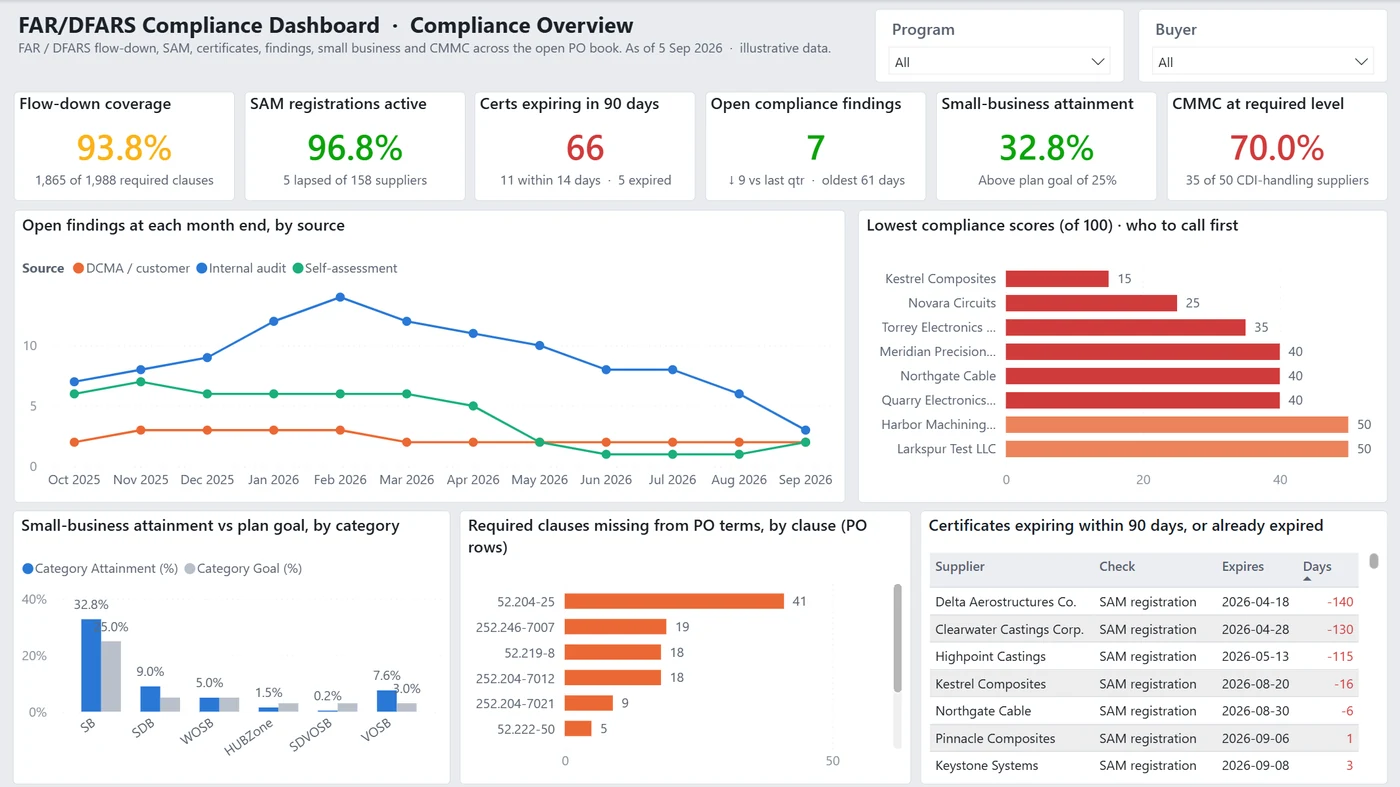
Page 1 is triage. The subtitle carries the as-of date and states "illustrative data" on the page itself — every supplier, CAGE code, program, buyer and figure in this report is fabricated. 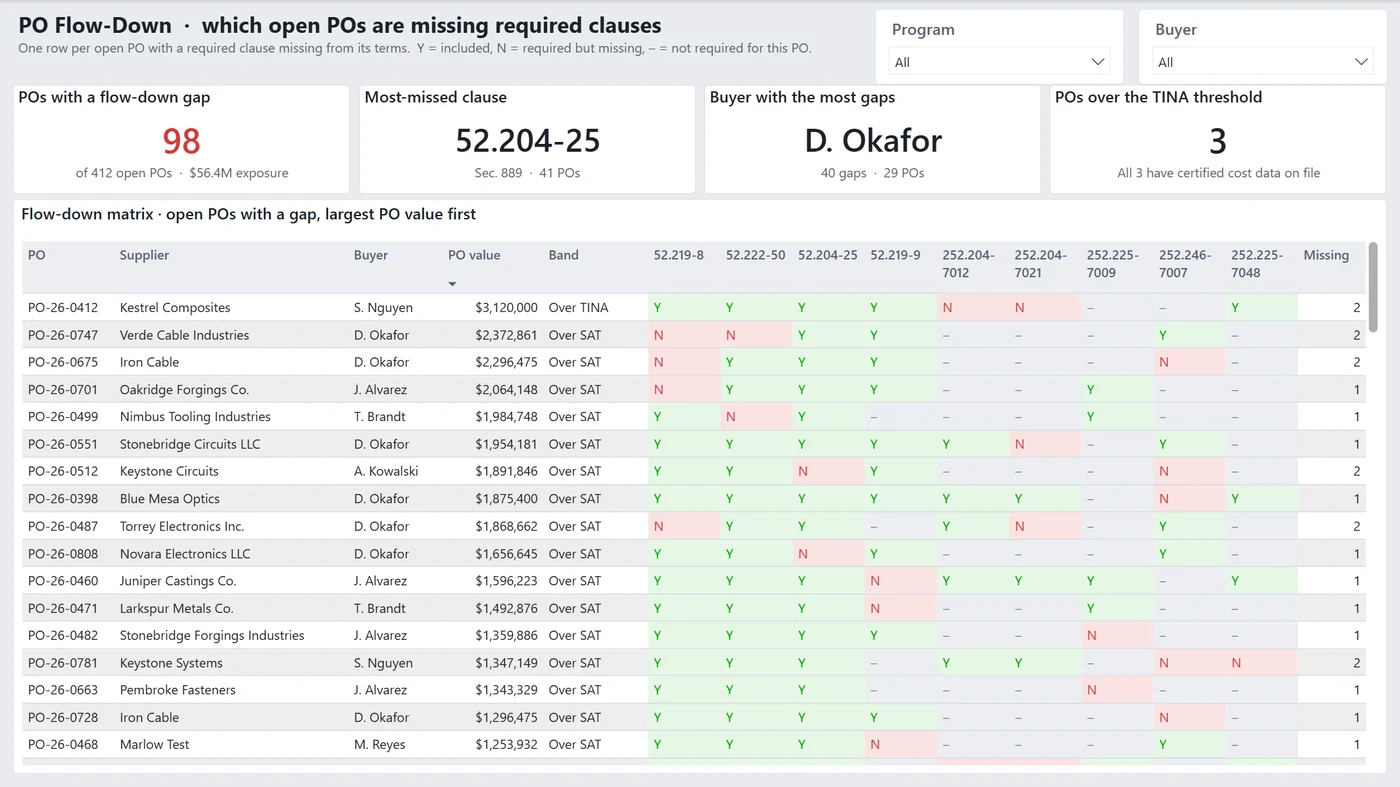
The matrix is the working document — one row per PO with a gap, nine clause columns, sorted by dollar value so the largest exposure is the first thing read. The dash matters as much as the N; a clause that was never required is not a failure. 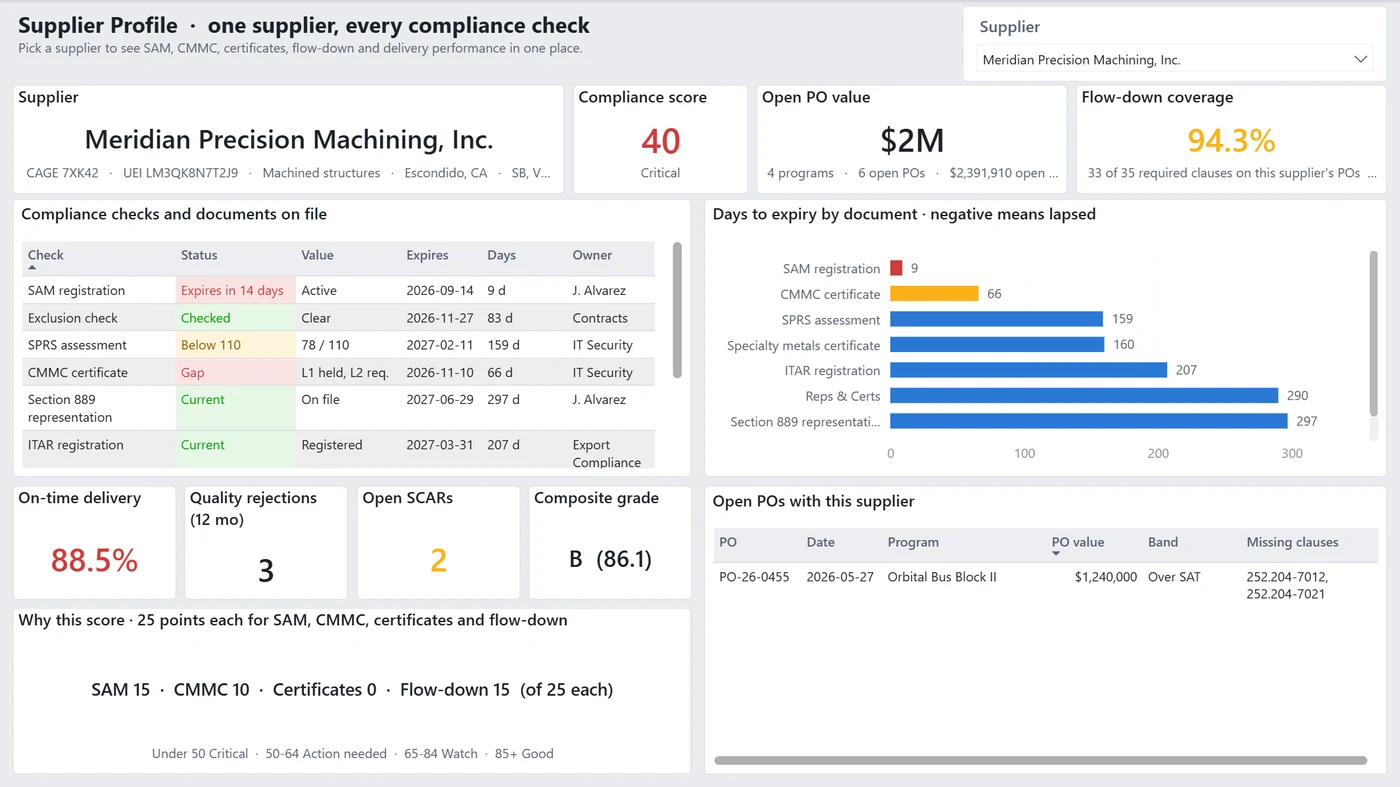
The score is never shown without its arithmetic. A supplier scoring 40 is not a red dot — it is SAM 15, CMMC 10, certificates 0, flow-down 15, and the zero is the thing to act on.
In one minute
A Power BI report built around the question a supply-chain compliance lead asks first: are the FAR and DFARS clauses actually flowing down to our suppliers, and which supplier do I call today? It is a compliance layer over the data an aerospace and defense company already holds — ERP purchase orders, the vendor master, SAM.gov, SPRS, certificate files, audit findings — and it replaces none of them. The data is fabricated. The model, the measure logic and the threshold discipline are the real work.
The problem
- Flow-down compliance is a join nobody owns. Whether a clause reached a PO depends on the prime contract’s clause set, the PO’s dollar threshold band and the PO’s actual terms — three facts that live in three places, so the question is usually answered by reading POs.
- “Compliant” is not one number. A supplier can be current in SAM, short a CMMC level, and carrying an expired certificate at the same time, and each of those is a different phone call to a different owner.
- A red cell is worthless if nobody can say what turned it red.
What I built
- Three pages, three questions, in escalating specificity. Page 1 is triage across the whole open PO book. Page 2 narrows to the POs with an actual gap. Page 3 is one supplier, every check. Nothing appears on an earlier page that the later page cannot explain.
- A star schema over one workbook. 14 tables and 8 relationships, all many-to-one and
single-direction, from a 13-sheet synthetic workbook.
PO Clausesis the grain that makes the report possible: one row per open PO per tracked clause, carryingRequired(derived from the prime contract’s clause set and the PO’s threshold band) andIncluded(what the PO terms actually say). Coverage is then just one over the other. - 110 measures in one
_Measurestable, grouped into ten display folders — SAM, CMMC, Certificates, Findings, Flow-down, Flow-down matrix, Score, Small business, Supplier profile, Settings — so the model is navigable rather than a flat list. - Nothing hard-coded that a regulation could change. The as-of date and the FAR dollar
thresholds (SAT, TINA) live on a
Settingssheet and are read as data. The workbook path is a single Power Query parameter, so relocating the folder is a one-value edit. - A scoring rule that shows its work. The compliance score is 25 points each for SAM, CMMC, certificates and flow-down, with the deduction for each stated in the model — and the supplier page prints the four components next to the total rather than only the colour.
- A build that is text all the way down. Saved as a
.pbip: the semantic model is TMDL and the report is PBIR, both diffable in git and editable without opening Desktop. The workbook, the model and the 70 report objects are each generated by a seeded Python script, so the whole artifact rebuilds deterministically.
Rules the whole system enforces
- A threshold is written down before it is coloured. Certificate status, score bands (under 50 Critical, 50–64 Action needed, 65–84 Watch, 85+ Good) and every RAG cut are defined in the repo, not in a visual’s formatting pane.
- Colour comes from a measure, not from a hand-formatted cell.
- The page states the question it answers in its own title, so a screenshot is self-describing.
- A number that means “not applicable” is shown as a dash, never as a zero or a failure — the flow-down matrix distinguishes required but missing from never required.
- Illustrative data says so on the page, next to the as-of date, not only in the README.
Outcome
- Every headline figure reconciles to a
KPI Summarytable the data generator writes from the same rows, and the reconciliation was run before shipping: coverage 93.8% (1,865 of 1,988), 98 POs with a gap against $56.4M of exposure, SAM active 96.8% (5 lapsed of 158), 66 certificates expiring within 90 days (11 within 14 days, 5 already expired), 7 open findings (down 9 on the quarter, oldest 61 days), small business 32.8% against a 25% goal, CMMC at required level 70% (35 of 50), most-missed clause 52.204-25 at 41 PO rows, D. Okafor the buyer with the most gaps at 40, 3 POs over the TINA threshold, lowest supplier score 15. - Five DAX and PBIR failures are written up in the repo rather than quietly fixed, including the two worth remembering: a column cannot sort by a calculated column derived from itself, and a measure that never returns blank cross-joins every table it touches unless it is anchored to a fact-table column.
- No time-saved, cost-avoided or accuracy figure is claimed. The data is illustrative and nothing in the report measures one.
Stack
Power BI Desktop .pbip project · TMDL semantic model (14 tables, 8 relationships, 110
measures) · PBIR report definition (3 pages, 70 visuals, a generated JSON theme) · Power Query
(M) over a 13-sheet Excel workbook · DAX · Python generators for the workbook, the model and
the report.