Case study
Supply Chain Program Dashboard
A four-page Power BI report for aerospace supply-chain program management, built from a written KPI spec rather than by dragging visuals — a star schema, 63 measures whose thresholds are documented, and headline numbers reconciled to the source workbook before shipping.
- Role
- Sole developer
- Organization
- Personal project
- Status
- Shipped
- Power BI
- DAX
- Power Query
- Data modeling
- Dashboard design
- KPI design
- Data visualization
Screens
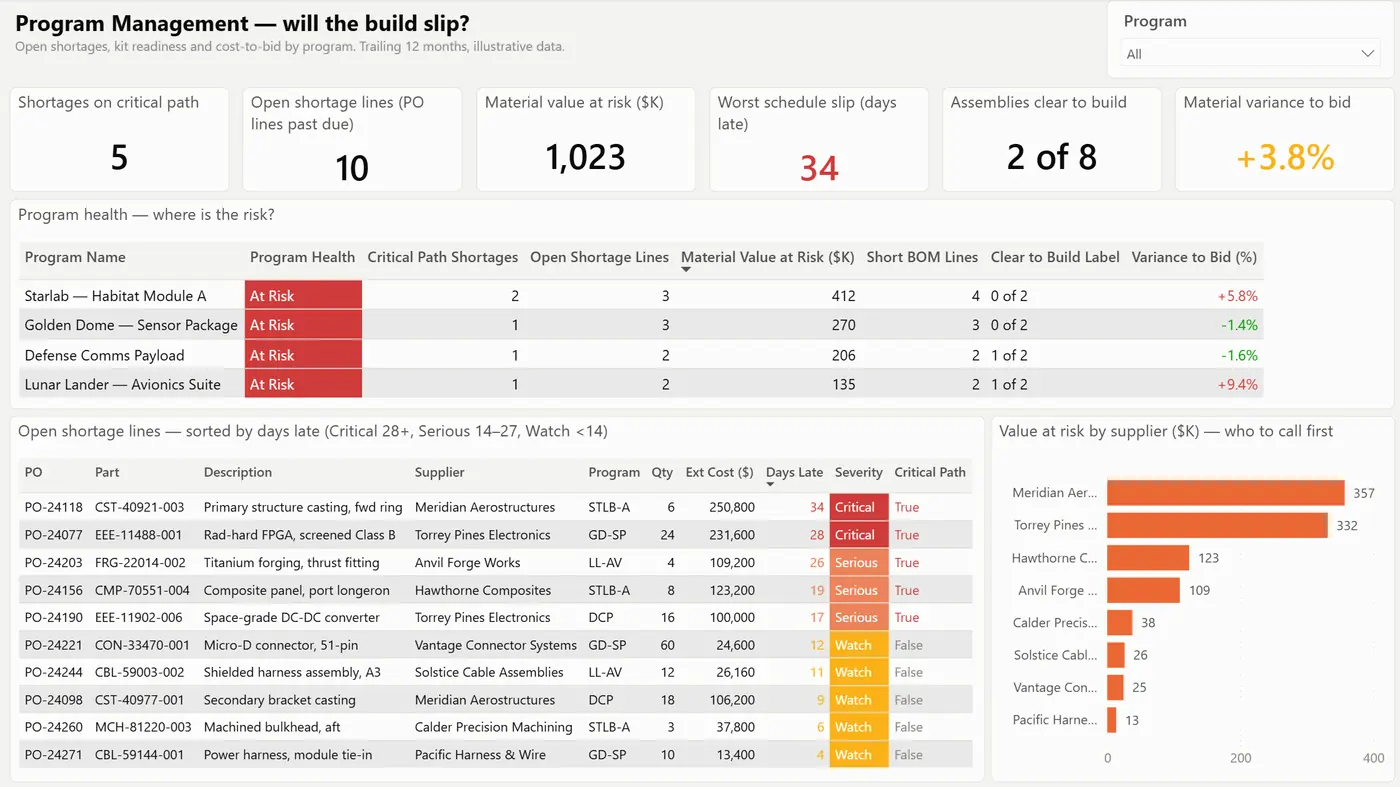
Page 1 answers the first question a program manager asks. The subtitle states "illustrative data" on the page itself — every supplier, part, program and figure in this report is fabricated. 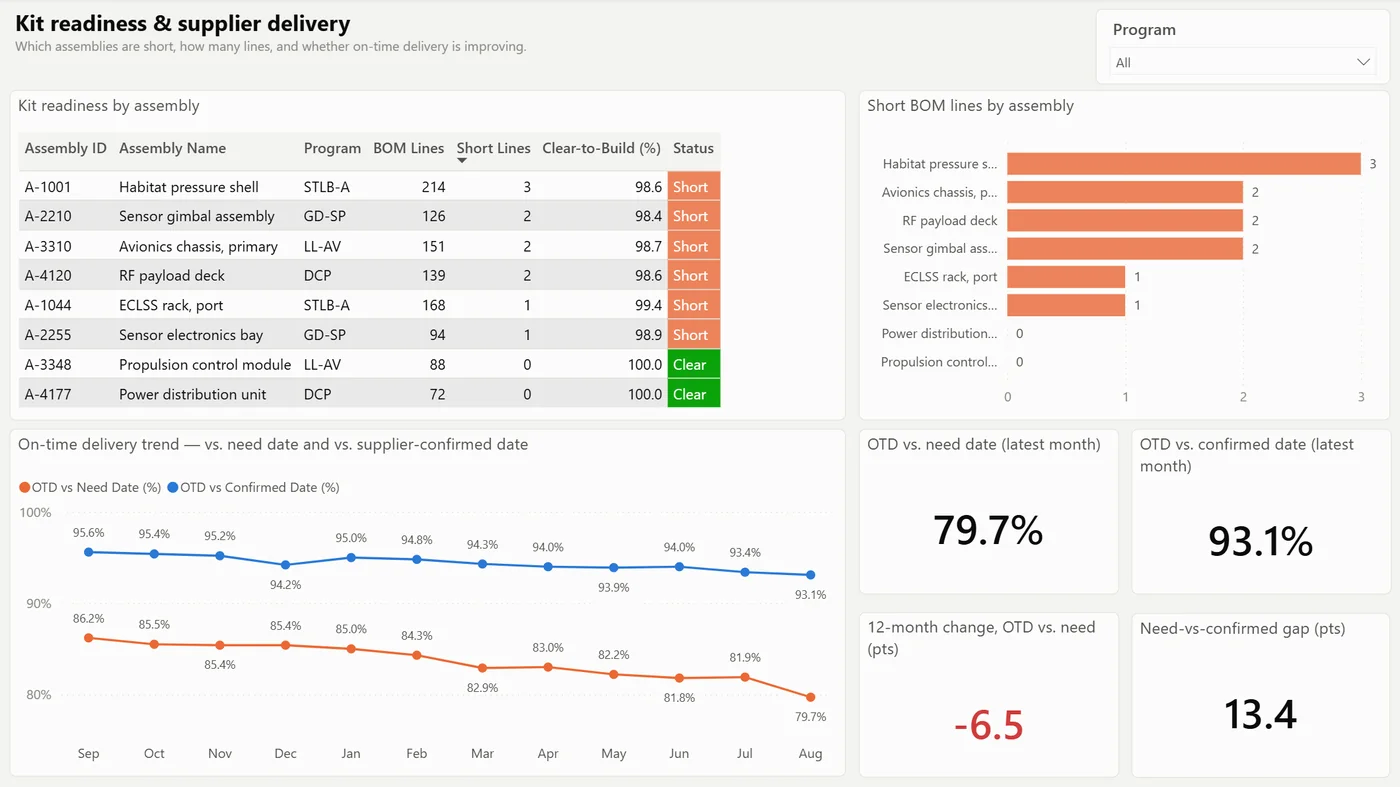
The two delivery lines are the point of the page. Measured against the supplier's own confirmed date performance looks fine; measured against the date the program actually needed, it has fallen 6.5 points in a year. 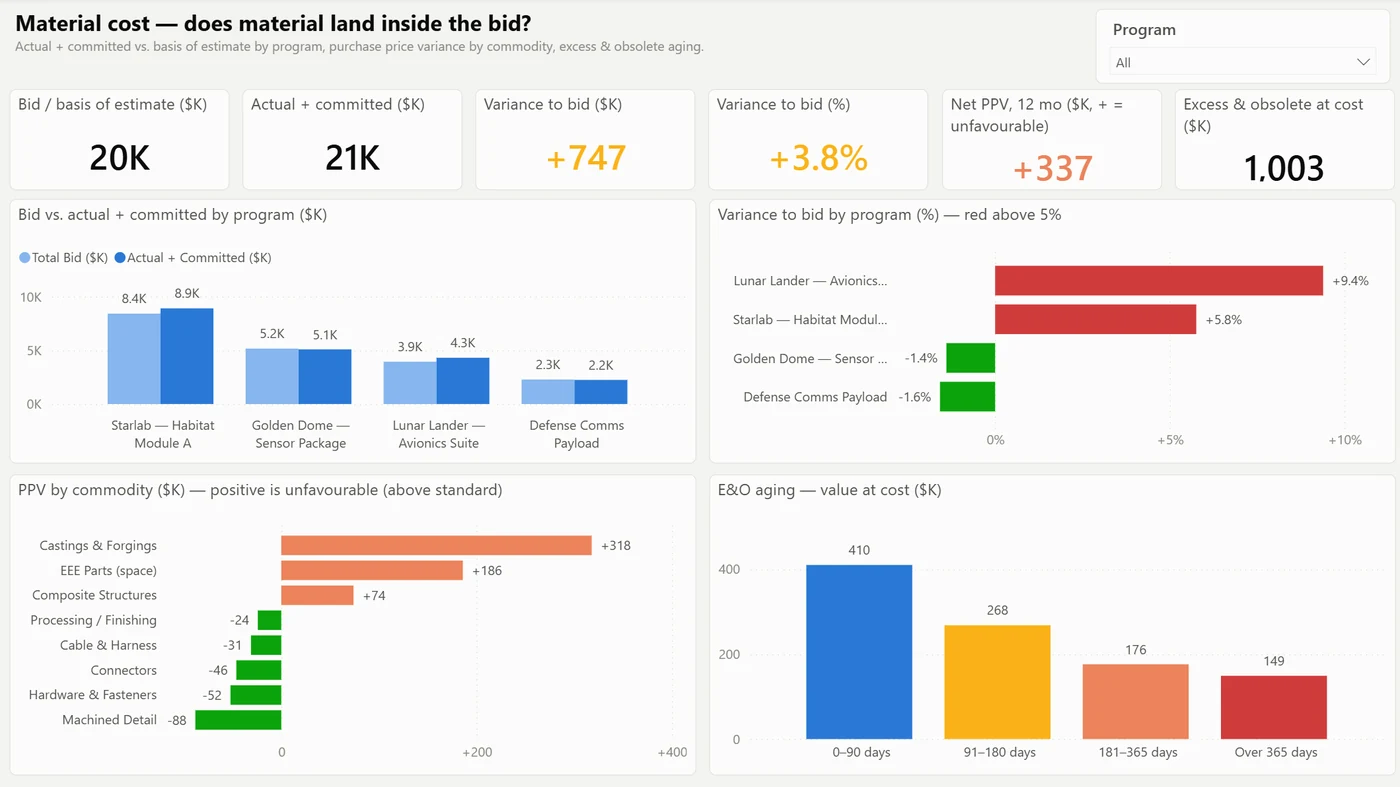
Variance is shown in dollars and in percent, per program, because a small percentage on the largest program is not the same problem as a large percentage on the smallest. 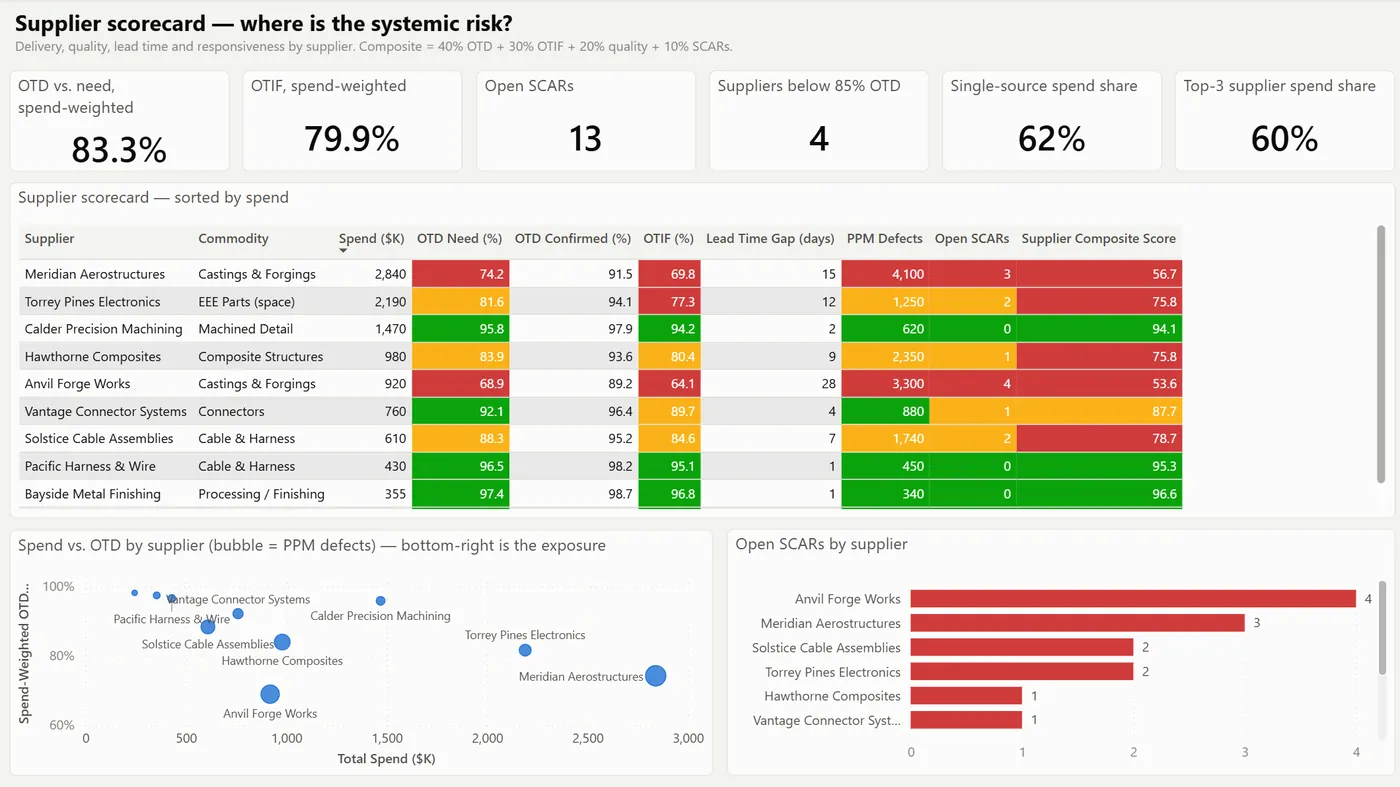
The scorecard colours each column against its own documented threshold, and the bubble chart puts spend and delivery on the same axes so the bottom-right corner is the exposure.
In one minute
A Power BI report that answers three supply-chain questions in the order a program manager asks them: will the build slip, does material land inside the bid, and where is the systemic supplier risk. The data is fabricated. The model, the measure logic and the build method are the real work.
The problem
- One workbook, eight sheets, one subject area each — schedule, kit readiness, cost and supplier quality — with no relationships between them, so no question that crossed two sheets could be answered in the file.
- The first snapshot was a
.pbixwith tables loaded twice and no report at all: a data load wearing a dashboard’s name. - The workbook had no shortage data in it, which is the one thing the first question depends on.
What I built
- A spec before any pixels. A page inventory (four pages, each with the one question it answers) and a KPI table giving every measure a name, a definition in words, a threshold and the page it lives on. That table became the DAX and removed most of the rework.
- A star schema instead of eight islands. 11 tables and 6 relationships, all many-to-one and single-direction. Programs and Months are dimensions; the rest are facts. Shortages are declared as a DAX table and flagged in the docs as the one input with no upstream source, so nobody mistakes it for a refreshable feed.
- 63 measures in one place. All of them in a
_Measurestable, grouped in display folders, written in one pass from the spec — base measures, then time intelligence, then the colour measures that drive conditional formatting. - Thresholds that are written down. Program health is At Risk if any shortage is 28+ days late or variance to bid exceeds 5%, Watch if any shortage is on the critical path or variance is above zero, otherwise On Track. Shortage severity, supplier RAG bands and the composite score (40% on-time delivery, 30% OTIF, 20% quality, 10% corrective actions) are all defined in the repo, not just in the colour of a cell.
- A theme file rather than 40 hand-formatted visuals. Palette, fonts and card radius are set once in a theme JSON generated from the mockup.
- A build that is text all the way down. Saved as a
.pbip, so the semantic model is TMDL and the report is PBIR — both diffable, both editable without opening Desktop.
Rules the whole system enforces
- A threshold is written down before it is coloured.
- Colour comes from a measure, not from a hand-formatted cell.
- The card shows the number the reader acts on, with the trend beside it — page 2’s headline is the latest month (79.7%), not the flattering 12-month average (83.8%), and that substitution is documented rather than quietly made.
- Illustrative data says so on the page, not only in the README.
Outcome
- Every headline measure reconciles to the source workbook’s own KPI sheet before shipping: 10 open shortage lines, 5 on the critical path, $1,023K at risk, 34 days worst slip, net PPV $337K, bid $19,800K against actual $20,547K (+$747K, +3.8%), E&O $1,003K, 2 of 8 assemblies clear, 13 open corrective actions, 62% single-source spend. One figure deliberately differs from the sheet, and the reason is written down.
- The build method is written up as a 14-step playbook covering all four phases, including the two failures worth remembering: conditional formatting in PBIR silently paints every bar the total’s colour unless the object carries a data selector, and a column cannot sort by a calculated column derived from itself.
- No time-saved or accuracy figure is claimed. The data is illustrative and nothing in the report measures one.
Stack
Power BI Desktop .pbip project · TMDL semantic model (11 tables, 6 relationships, 63
measures) · PBIR report definition (4 pages, 42 visuals) · Power Query (M) over an Excel
workbook · DAX · JSON theme file.